













📦Overseas Warehouse Guide
How to Check Whether a Product Has an Overseas Warehouse
To help you receive your order faster and understand shipping options clearly, please follow the steps below to check whether a product is stocked in an overseas warehouse.
1. Check the Shipping Label on the Product Image
On the product cover, please look at the top-right corner of the product image:
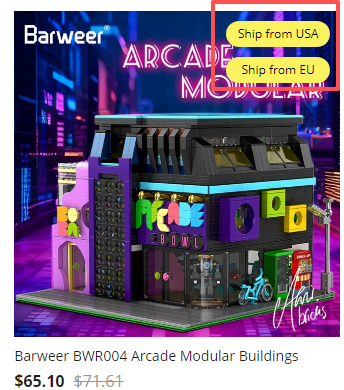
This means the product can be shipped directly from our U.S. warehouse.
✔ Faster delivery
✔ Free shipping within the United States
This means the product can be shipped from our European warehouse.
✔ Free local shipping within Germany
✔ Additional shipping fees may apply for some other European countries
2. Check the Product Details Page for Warehouse Stock
Click on the product to enter the Product Details Page.
In the Product Description / Product Introduction section, you will find clear information about which warehouse currently has stock.
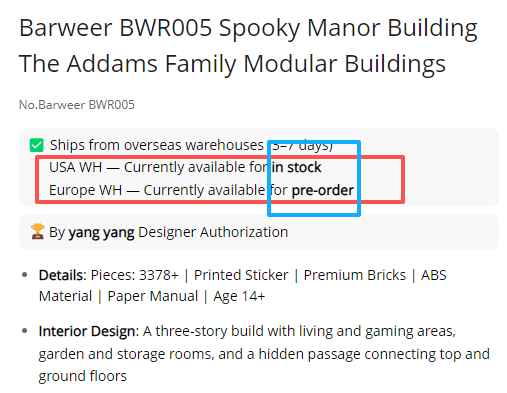
For example:
If the U.S. warehouse is marked as “In Stock available”, you must:
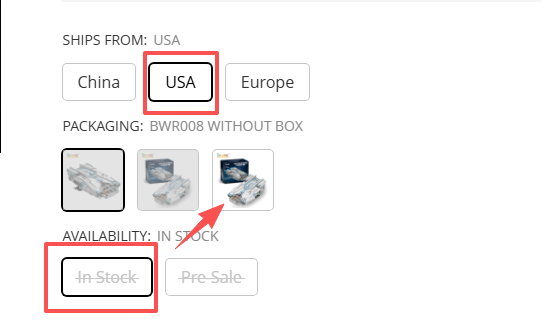
Only after selecting the correct warehouse and inventory status will the system automatically display which product options are currently in stock.
3. Check Estimated In-Stock Time for Overseas Warehouse Pre-orders
If the product you ordered is an overseas warehouse pre-order and you would like to know the estimated arrival or in-stock time:
This section provides an approximate timeline for when the product is expected to be available for shipment.
To help you receive your order faster and understand shipping options clearly, please follow the steps below to check whether a product is stocked in an overseas warehouse.
1. Check the Shipping Label on the Product Image
On the product cover, please look at the top-right corner of the product image:
- “Ship from USA”
This means the product can be shipped directly from our U.S. warehouse.
✔ Faster delivery
✔ Free shipping within the United States
- “Ship from EU”
This means the product can be shipped from our European warehouse.
✔ Free local shipping within Germany
✔ Additional shipping fees may apply for some other European countries
2. Check the Product Details Page for Warehouse Stock
Click on the product to enter the Product Details Page.
In the Product Description / Product Introduction section, you will find clear information about which warehouse currently has stock.
For example:
If the U.S. warehouse is marked as “In Stock available”, you must:
- Select the USA warehouse option
- Choose the In Stock status
Only after selecting the correct warehouse and inventory status will the system automatically display which product options are currently in stock.
3. Check Estimated In-Stock Time for Overseas Warehouse Pre-orders
If the product you ordered is an overseas warehouse pre-order and you would like to know the estimated arrival or in-stock time:
- Scroll down on the Product Details Page
- Look for the Reference Time / Estimated Availability Time

This section provides an approximate timeline for when the product is expected to be available for shipment.


